
Q.If the JOG Operation command (+JOG, -JOG, FW-JOG-P, RV-JOG-P, etc.) is turned ON for a stepper motor, but the motor does not engage in continuous operation, what could be the reason?
JOG operation is a function for positioning by the travel amount set by the "JOG travel amount" parameter.
Therefore, continuous operation is not possible.
For continuous operation, input a signal for starting continuous operation (FWD input, RVS input).
Note
In the case of the AZ Series, the names of the I/O signals corresponding to JOG operation and continuous operation are different.
If you are using the AZ Series, refer to the following FAQ.
For stepper motors other than the AZ Series, refer to the following.
JOG Operation (+JOG input, -JOG input)
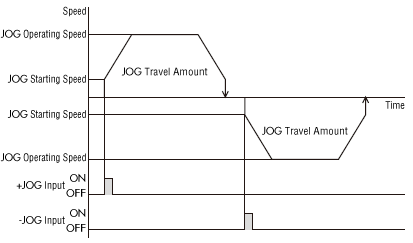
JOG operation is a function that performs positioning operation for travel amount set by the "JOG travel amount" parameter.
When the +JOG input is turned ON, JOG operation is performed in a + direction, and when the -JOG input is turned ON, JOG operation is performed in a - direction.
This function is useful for fine-tuning the position.
Related Parameters
| MEXE02 Tree View | Parameter Name | Description | Initial Value |
|---|---|---|---|
| Operation | JOG travel amount | Sets the travel amount for JOG operation. [Setting range] 1~8,388,607 steps |
1 |
| JOG operating speed | Sets the operating speed for JOG operation. [Setting range] 1~1,000,000 Hz |
1000 | |
| JOG acceleration/deceleration | Sets the acceleration/deceleration rate (acceleration/deceleration time) for JOG operation. [Setting range] 1~1,000,000 (1 = 0.001 ms/kHz or 1 = 0.001 s) |
1000 | |
| JOG starting speed | Sets the starting speed for JOG operation. [Setting range] 0~1,000,000 Hz |
500 |
Operation Image
Continuous Operation (FWD input, RVS input)
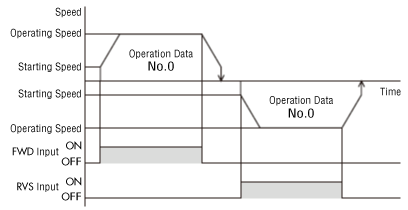
While the FWD or RVS input is turned ON, the motor will run continuously.
Both FWD input and RVS input operate at the operating speed of the selected operation data number.
Related Operation Data
| MEXE02 Tree View | Item | Description | Initial Value |
|---|---|---|---|
| Operating Data | Operating Speed | Sets the operating speed for continuous operation. [Setting range] 1~1,000,000 Hz |
1000 |
| Acceleration | Sets the acceleration rate (acceleration time) for continuous operation. [Setting range] 1~1,000,000 (1 = 0.001 ms/kHz or 1 = 0.001 s) |
1000 | |
| Deceleration | Sets the deceleration rate (deceleration time) for continuous operation. [Setting range] [Setting range] 0~1,000,000 (1 = 0.001 ms/kHz or 1 = 0.001 s) |
1000 |
Operation Image
Product Category: αSTEP , Stepper MotorS , Electric Actuators
Model and Series: AR Series , RKII Series , PKA Series , Electric Actuators AR Series Equipped , Electric Actuator RKII Series Equipped
Description: Usage and Setting Methods
FAQ No.: 434
- Discontinued Product
- PKA Series, DGII Series (RKII Series equipped)
Email al supporto tecnico
Dopo aver aperto l'e-mail, controlleremo il contenuto e vi contatteremo. A seconda della natura della vostra richiesta, potremmo contattarvi telefonicamente.