
Q.I am using an AZ Series EtherNet/IP compatible driver. How do I carry out multi-axis connection with the driver?
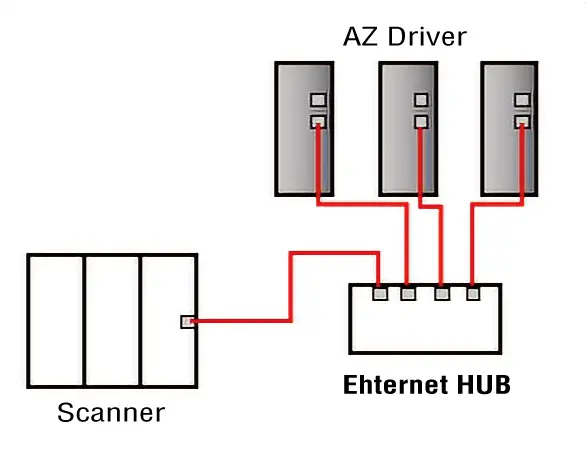
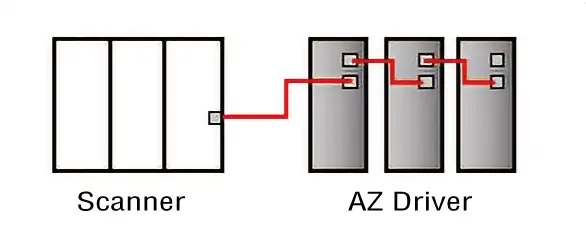
3 connection methods are supported: Star, Linear, and Ring (Device Level Ring).
Star
Connect using a general purpose Ethernet HUB.
Linear
2 RJ-45 EtherNet/IP ports are installed in the driver.
You can use these ports for daisy chain connection.
Ring*
Connect in a ring using 2 EtherNet/IP ports.
Communication can be continued even if the Ethernet cable is disconnected midway through.
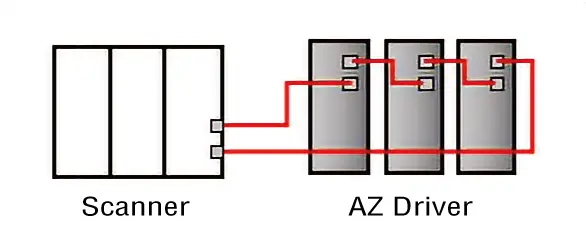
- *When using the Device Level Ring, all devices in the ring connection must support DLR.
In addition, please be sure to connect a device with a supervisor function between the connected scanner (host controller) and the AZ driver, and then configure the settings properly.
Related Information: AZ Series EtherNet/IP TM Compatible Driver FAQ
Product Category: αSTEP, electric actuators
Model and Series: AZ Series, electric actuators AZ Series equipped
Description: Wiring method, usage and setting method
FAQ No.: 545
Email al supporto tecnico
Dopo aver aperto l'e-mail, controlleremo il contenuto e vi contatteremo. A seconda della natura della vostra richiesta, potremmo contattarvi telefonicamente.