
Q.READY output (operation ready output) does not turn ON in AZ Series. How do I turn it ON?
If the READY output is not turned ON, it will cause the motor to not run.
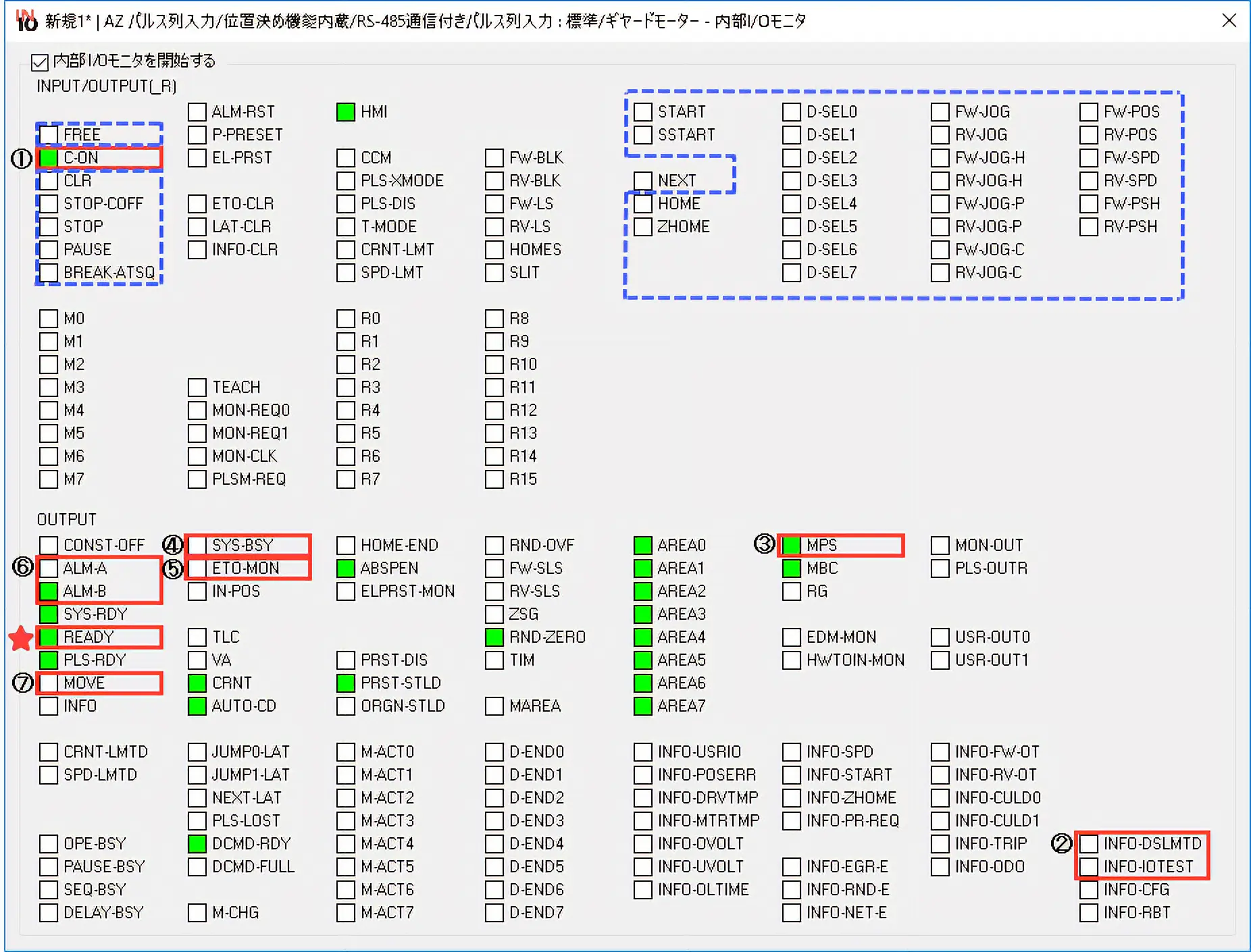
Check the ON/OFF status of each I/O signal, and set the status to the same as below.
The status of I/O signals can be checked with the "internal I/O monitor" of the MEXE02 support software.
The ON/OFF status of I/O signals is displayed as follows.
| Display | Internal Signal Status |
|---|---|
| ON (green) | Active |
| OFF (white) | Inactive |
- Blue Frame
- If there is a signal that is turned ON, turn that signal OFF.
- Red Frame
- If the ON/OFF status of I/O signals is different from that shown in the figure, check the following content.
- ①
-
Turn C-ON input ON.
If C-ON input is assigned to direct I/O or remote I/O, turn it ON.
There is no assignment at the time of shipment (it is automatically turned on).
- ②
-
Turn INFO-DSMLD output and INFO-DSLMTD output OFF
If it is ON, MEXE02 teaching, remote operation, download, and I/O test are being executed.
Please exit.
- ③
-
Turn MPS output ON
If it is OFF, the main power supply is not turned ON. Turn the main power supply of the driver ON.
- ④
-
Turn SYS-BSY output OFF
If it is turned ON, maintenance commands are being executed via RS-485 communication. Please exit.
(configuration, data batch initialization, all data batch initialization, Read batch NV memory)
- ⑤
-
Turn ETO-MON output OFF
If it is ON, the driver is in ETO-mode. Release the ETO-mode.
- ⑥
-
Turn ALM-A output OFF and ALM-B output ON
If ALM-A output is ON and ALM-B output is OFF, an alarm has occurred. Disable the alarm.
- ⑦
-
Turn MOVE output OFF
If it is ON, the motor is operating. Shut down the motor operation.
Product Category: αSTEP , electric actuators
Model and Series: AZ Series , electric actuator AZ Series equipped
Description: Usage and setting methods , abnormalities and problems
FAQ No.: 570
Related FAQs
E-Mail an Technischen Support
Nach dem Öffnen der E-Mail werden wir den Inhalt prüfen und uns mit Ihnen in Verbindung setzen. Bitte beachten Sie, dass wir Sie je nach Art Ihrer Anfrage u. U. telefonisch kontaktieren.